
How to Host a Live Webinar for FREE Using Google+ Hangouts

In this post we wanted to share what we learned about how to host a live webinar for free using Google+ hangouts. We have attended live webinars hosted through Google Plus and have heard many people talk about doing it. But, unfortunately, we could not find many tutorials that could walk us step-by-step through the entire process. Our learning curve was steep and included trial and error, online research and asking colleagues who have hosted hangouts in the past. Therefore, we decided to take what we have learned and write this tutorial in hopes this it will help many people save tons of time learning how to use Google+ hangouts in the future!
Our 12 Step Process of Setting Up a Live Webinar with Google+ Hangouts
You can watch the video tutorial below and read our checklist below. As with any social media platform, Google+ is constantly changing. But, we wanted to share these tips to get you started on Google+ Hangouts.
February 2014 UPDATE: See the updated video at the bottom of this post.
Step #1: Decide how you will host the event.
Here are your options:
- Create an event through Google +
- Set up a blog post where you can have it playing live or wait and publish it afterwards with the embedded video.
- Send people directly to the YouTube video link
We recently hosted a live webinar and created an event. You can see the event page here.
To set up an event click the homepage icon on Google Plus and then click events.
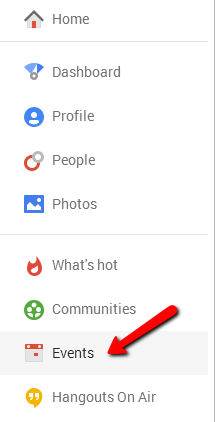
Then, you can choose a “Create Event” or a “Plan a Hangout.” The “Plan a Hangout” is new and from my testing, it did not appear as if you were given an embed code, so I recommend choosing “Create Event” as that is what we have used previously and the process we describe in this tutorial.

Then, fill in your event details.
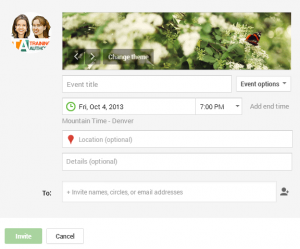
Step #2: Send your co-presenters the information about the presentation.
Invite any other presenters to the Google+ event you created and let them know that you will invite them to the hangout just before the webinar is to take place.
Here is a tutorial you can send your guests to make sure everything goes smoothly.
Step #3: When it’s time to start the hangout, start a “Hangout on Air,” invite your presenters and embed the live video onto the event page and/or the blog post.
On you Google Plus home page, click on the homepage icon in the upper left corner and then choose hangouts from the dropdown menu.
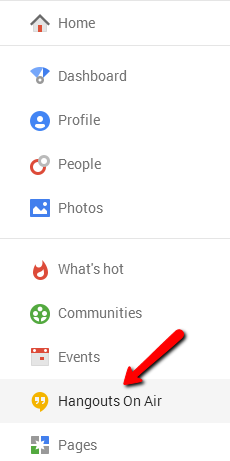
Click on “Start a Hangout On Air”

Make sure to use the Google+ profile or page that is associated with your main YouTube account. For some reason, our Training Authors YouTube account is connected with our page and not our profile. So, in order to have the video automatically saved to our YouTube channel, we needed to set up the Hangout On Air through our page.
To embed the video on your event page, first get the YouTube link by clicking the “embed” link at the top of your Hangout On Air and copying the URL.

Then, on your event page, click the dropdown menu next to “Details” and choose edit event.
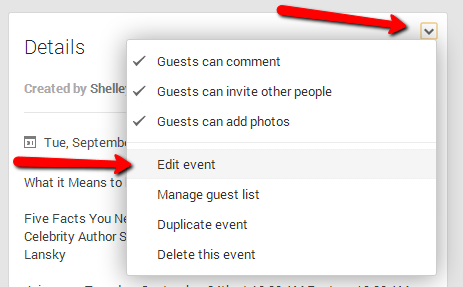
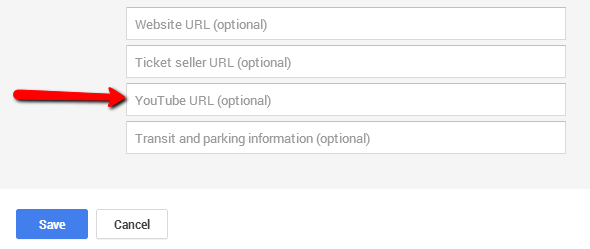
Then, under the dropdown menu “Event Options” choose to show more options.

There will then be a place for a YouTube URL and that is where you will enter your Hangout On Air URL.
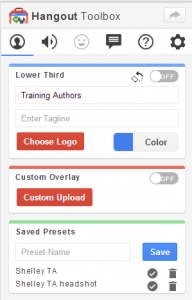
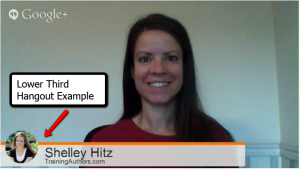
Step #4: Turn on lower third app and make sure text and branding is correct.
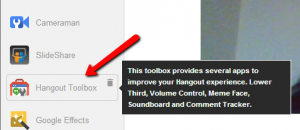
*Found in the free toolbox app – you will need to add it if you haven’t already.
Step #5: Prepare your PowerPoint slides
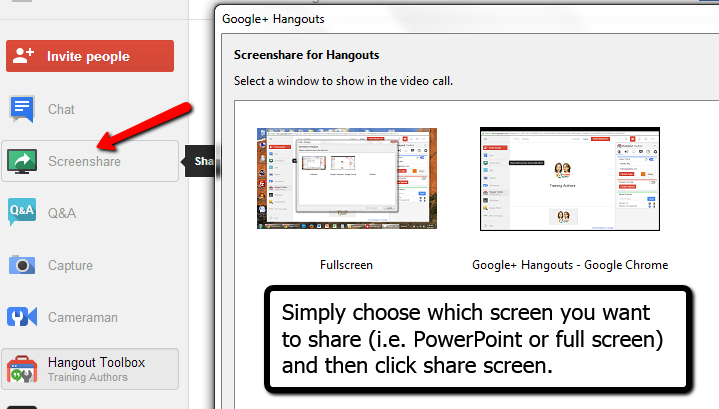
You have two options. You can upload slides to the Slideshare account that is connected to that Google account and use the Slideshare app. We tried this option but found it was easiest to simply use PowerPoint on our computer and then use the screenshare app.
To use the screenshare app, click on it and then choose the screen you want to display to your attendees.
Step#6: Test your video and audio settings.
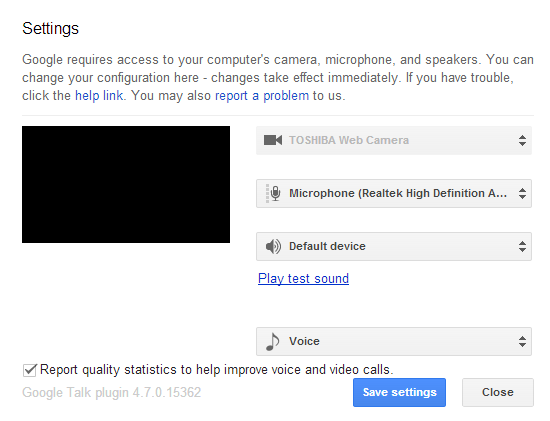
Click the small “gear” icon in the right hand corner to test your video and audio settings prior to starting your broadcast.

Step #7: Decide how participants can ask questions.
Google+ hangouts currently have a live Q&A feature that you can use. However, this did not seem to be accessible through the blog post embedded video and it must be turned on BEFORE you broadcast your webinar. You can also take questions through your Google+ event page and/or blog post comments. One thing we did notice is that the Google+ event comments are currently not nested. And so to reply to someone, we tagged them in a new comment.

Step #8: Start broadcasting the hangout at the correct time.
This is pretty simple, just click the broadcast button.

Step #9: Manage what the attendees see on their screen.
You can turn off your video if you want your attendees to see only the slides. You can also turn off your co-presenter’s video by clicking on the “Cameraman” app and then clicking their video icon.
Step #10: Watch the right side of the screen for questions during your webinar if using the Q&A feature.
You will want to moderate and answer any questions that come in during your webinar if you have chosen to use the Q&A feature.
Step #11: End the webinar and complete any editing of the video replay.
To edit your video, you can either use the YouTube editor or download it to your computer to edit it with your own video editing software (to download a video from YouTube, place “ss” in front of “youtube” in the URL and then you’ll get a download option). It does take a few minutes for the complete hangout video to be processed and available for editing or download in your YouTube account, so be patient.
Once your edits are complete, save or re-load the edited video. Either way this will change the videos URL so you’ll need to update it on your blog and within your event page.
*To update the URL your event page, click the dropdown menu next to “Details” and choose edit event. Then, under the dropdown menu “Event Options” choose to show more options. There will then be a place for a YouTube URL and that is where you will enter your new video URL
Step #12: Share the replay link with those who couldn’t make it live.
If you want, you can choose to have the YouTube video unlisted and only available to your paid customers, etc. You can see how we embedded the video in our blog post here.
February 2014 Update
Watch the first 17 minutes of the video below for changes made to hangouts since publishing this post.
Hangout Guides from Google:
- Google+ Hangouts On Air guide – http://services.google.com/f
h/files/misc/googleplus- hangouts-on-air-guide-may- 2013.pdf - Scheduling a Hangout On Air – http://services.google.com/f
h/files/misc/scheduling-your- hangout-on-air-dec-13.pdf - Sourcing Participants for Your Hangouts On Air – http://services.google.com/f
h/files/misc/sourcing- participants-for-hangouts-on- air.pdf - Hosting Broadcast Quality Hangouts On Air – http://services.google.com/
fh/files/misc/broadcast_hoa_ google+.pdf - How to Broadcast a Hangout On Air – http://services.google.com/
fh/files/misc/how-to- broadcast-a-hangout-on-air.pdf - Promoting your Hangout On Air – http://services.google.com/
fh/files/misc/promoting- hangoutsonair.pdf
Google Helpouts Coming Soon
There will also soon be another way to connect with your audience live called Google Helpouts. Request an invite here: https://helpouts.google.com
Host a Private or Unlisted Hangout On Air from YouTube
Now you can start a private or unlisted hangout on air from YouTube. This video below shows you how to do this (forward ahead to the 8 minute mark)
Looking for a Google+ Hangout Webinar Service Option?
If this seems too complicated for you and you would like more features with your Google+ Hangouts, then consider one of the options below.
LeadPages
I have personally been using this system for webinars and paid online workshops for months now and LOVE it! It’s super easy and the only thing you need to pay for is LeadPages. I show you step-by-step in this video tutorial how to set up a webinar with Google+ Hangouts and LeadPages.
Share Your Google Plus Hangout Tips!
We are still learning how Google+ hangouts work and would love to hear your tips. Have you used a hangout? How did it go? Any advice that you have for us and others that want to use Google+ hangouts for live webinars? Share in the comments below.
Note: We are especially grateful for Denise Wakeman from Adventures in Visibility who answered several of our Google+ questions as we were in the learning process. Thank you Denise! She has a full training program about Google+ and Hangouts that I highly recommend.
Did you find this tutorial helpful? If so, pay it forward by sharing with others below:
Last Updated: June 19, 2024
Thanks for the shout out, Shelley. This is a very thorough tutorial, nice job! As with every social network, Google makes frequent changes to Hangouts so it’s a never ending challenge to keep up with best practices. And it’s worth it for getting the benefits of this excellent marketing tool!
You’re welcome, Denise. Thank you for all your help. I do realize that Google+ is changing rapidly and hope to update this post from time to time. And yes, definitely worth learning the process!
Thank you from an “old guy” who needs to see this 3-4 times and do at least a couple of trial runs before going live.
So far, the most clear and concise instructions I’ve found
You’re welcome! Glad it was helpful for you.
Author Samantha Fury and I host 15 minute tutorials on self publishing basics called Indie Author Chat via Google+ Hangouts. They’re posted on Youtube also.
We provide information on the best free and low cost options self publishers can use to create a professional book.
Lisa,
I’ve seen your hangout before and am glad that other authors are taking advantage of the technology. Feel free to share any other tips you have learned using hangouts.
I will keep this information for future reference. Thank you for being willing to also update it if it is needed.
Great! And you’re welcome 🙂
This is timely. I’ve been thinking about offering on-demand seminars through my blog. What do you think is the best way to offer them on-demand? I have 4 children I homeschool, so conference calls are difficult. I can just imagine being interrupted–even if my husband is home. Late night is probably the best time for me to record something. So, do I do a conference call first (with no one on it but me), then edit it and put it on my blog? Or is there a better, free way to do this? Thanks so much!
Connie – I’d recommend that you check out my posts about teleseminar tools and tips. I have used FreeConferencing.com and show you why I like it here: https://www.trainingauthors.com/teleseminar-services-for-authors/
And here are my tips on hosting one. You can actually do live calls with prerecorded info which may be what you want to do: https://www.trainingauthors.com/teleseminar-basics-for-authors/
Shelley – Thank you so much for going through this process so it’s easier for me to set up a webinar on hangouts. I’m sure you will have saved me much blood, sweat and tears. I’ve searched a bit for this kind of information and this is the best resource I’ve found so far. I look forward to following this closely when I’m ready to put my webinar together.
Josh – you are welcome! We also searched for a tutorial like this and couldn’t find one. I actually saw someone selling a training for $57 this week that shows you how to do what we shared with you in this post for free. I hope many find it helpful!
Thank you! I’m getting ready to do my first G+ Hangout. I’ve been searching for something to let me know exactly what to do and there really is nothing out there. I’m feeling a little better now. Thank you, thank you, thank you!
You are very welcome Stephanie! Good luck on your first G+ hangout!
Hello Shelley (and Heather)!
This is precisely the set of instructions I was looking for, in order to learn how to use Hangouts on Air for webinars. Webinars is something I’m adding for my business, and it’s amazingly sweet, for once, not to have to bang my head against the wall to find the real-world explanation for how to use a new digital tool. I can relate to the hard work you put in working your way through the options and coming to terms with a formula that works for you… I will take your instructions and put them through their paces. If I find anything that I think can shed any additional light, I will come back in here and post it. Very much appreciated. Thank you!
Mark,
You’re welcome! Google+ Hangouts are great for so many reasons, but can be difficult to get set up the first time around. Let us know any tips/tricks you learn along the way. 🙂
Hey Ms H, Thanks for a very comprehensive low-down on how to get started with hanging out on G+. I thought that I would be in for the long haul trying to work this out, but your guide has saved me a ton of time.
Nice work
Cheers
Mark
Mark,
You’re welcome! Glad to have saved you some time!
Thank you so much for such a detailed post on how to host a live webinar with google hangouts. It is very thorough and the instructions stepped out are great. I spent the day playing with gotowebinar and the pricing seemed way over the top, especially if you are just starting out in the market of webinars. Do you consider google hangouts as a good option to conducting webinars? Look forward to your reply. Kind regards Kim 🙂
Hi Kim! We actually switched from Go To Webinar to Google Hangouts earlier this year. Unless you are charging for your webinars, or have a high attendance rate, Google hangouts are perfect for authors. And the best part is that they are automatically re-purposed into videos for you. With Go To Webinar, you have to click the button for them to record, then upload it when you’re finished. It always took me an extra hour or two of work after the webinar to make the replay available. Google Hangouts does it for you.
Kim,
Google+ hangouts are a great way to do webinars and you can even do private or unlisted ones as described in this video (start at around minute 8): http://www.youtube.com/watch?v=_gRZHkx3YuM
However, just know that G+ is always changing and so that means you may have to keep up with those tech changes. For those reasons, some people prefer a service like GotoWebinar or using a service like Webinars on Air along with G+. It just depends on your comfort level of working with the tech side of Google Plus. 🙂
Nice simple step by step guide on setting up a Webinar for free through Google+ account with pics, thanks for such an informative tutorial with awesome and clear pics.
Hey Shelly, great and helpful post.
Just a quick question… if I am hosting a Google Hangout on my blog page with the embed code what do you suggest is the best software to use to take live private questions (so only I can seem them in real time vs everyone seeing them like in a chat option).
Since it is embedded on my own site I cannot use the google hangouts Q&A option so any suggestions would be a great help!
THanks so much.
Side note… what doing a powerpoint share ONLY… is it best to do full screen and just leave on it the powerpoint or to open the powerpoint and select it when choosing screen share options?
Nic,
You’re welcome! If you embed it on your site, you may have to use the blog post comments to take questions. You don’t have to approve them and make them live on your site so they still stay private, but it gives you a way for your audience to submit them. As far as PowerPoint, we have just used the full screen option. I would suggest doing a trial and see if one way works better than the other. I’ve found that G+ hangouts can still be buggy sometimes but it’s free so I won’t complain. 🙂
Shelley & Heather thanks a ton for putting up this awesome step by step training! I needed the information so much. Got everything I was looking for. Your guide is so awesome that I won’t need to look at any other resources to start. That’s why it’s showing up at #1 in Google 🙂
I have one question. Why the logo is looking so ugly when I am uploading for the lower part of the hangouts? I tried to upload my own photo. Nothing better.
Thanks Sourav! Glad you found the information helpful! As far as the logo, you might check the quality of the picture you are using. Good luck to you in your hangouts.
Can Google plus be used for webinars for people who do not use google plus? We do lots of B2B live demos, looking for an alternative to traditional methods.
Mark,
You do need to have a Google+ account to host hangouts. But, it’s free to sign up! 🙂
So if you use YouTube to set up a Hangout then it can be private and not public right?
Right! You just choose whether you want the YouTube video to be private, unlisted or public when you set up your hangout on the YouTube side. I did this recently for a mastermind meeting. 🙂
Thanks you very much for this step by step tutorial.
Great Tutorial. Thanks for taking the effort.
I’m going to try it now.
Thanks for the tips, great post. I found the toolbox and downloaded it but its not actually added to my hangout or on air hangouts menu anywhere. I had to go and download it which started a new session, how do i get it to be added to a scheduled hangout?
I’m confused about this as well
Hey Sarah, you should have the option after you open the actual hangout, before you go live, to open the toolbox and add the lower third.
I see I’m a bit late to the party (this post is about 6 months old), but I hope you don’t mind. I found this particular blog entry with a web search on “alternatives to GoToWebinar.” (Not a Google search, though. There are other search engines that give much more relevant results for that sort of query.) Seems your favorite is WebinarsOnAir, which is only slightly less pricey than GoToWebinar. Since this post was written, there is a new product called WebinarJam, which appears to have all of the features of WebinarsOnAir without the artificial restriction on the number of users.
So I don’t plan to buy WebinarsOnAir. But I don’t plan to buy WebinarJam, either. For the following reasons:
1) G+Hangouts on Air seems to have everything you really need, without a paid subscription model. At least for now.
2) WebinarsOnAir and WebinarJam both appear to just be interfaces veneered over G+HOA. In the Design Patterns that we programmers use (I’ve been a programmer for 4 decades), this is called the Facade Pattern, and I suspect the functionality of this sort of program could be duplicated in a couple of months by a team of 3-4 programmers. Of course, since it’s a front-end for G+ that relies on the G+HOA API, and G+ changes more often than the wind in Dallas, whoever markets and supports this program would then be sentenced to permanent continuous maintenance. But still, I expect to see similar programs being rolled out by dozens of different copycats in the next few months, and probably at much lower price points.
3) There is even a more important reason, which I alluded to in point #2 — it’s based on G+HOA. While G+ is the current flagship product from Google, the ability to create low-cost (or even free) webinars is going to attract enough spammers, scammers, and other riffraff to destroy it in it’s current form. And soon. I don’t think it’s a wise business plan to depend on Google for anything important. (I see my rant on *that* subject has already showed up in the commentluv.)
If I decide to do a webinar (and I might, fairly soon), I will probably use straight G+HOA. After all, I *am* a techie. I’m tempted to build my own front-end for G+HOA similar to WOA or WJ, and duke it out with the hordes I foresee in #2, but I will probably resist that temptation because reason #3 would also apply to me.
But… Fabulous post anyway! I see that you folks are more in the “how to write a book” niche than the “how to do webinars” niche, and I will be following for that reason. I’ve written some Kindle books already, but I haven’t exactly set the world on fire with them. Yet. Maybe you will show me how to do that.
Excellent article. I forgot all about WebinarsOnAir until I read this article! Awesome information. Will be checking out the rest of your posts. Thanks
Do you know if there is a maximum number of attendees that can view Hangouts webinars at once? Thanks in advance for your reply!
You can have 10 presenters but unlimited people who view your hangout.
Regarding that unlimited viewer number….how many can participate in the chat feature during a webinar?
Hi Mimi. Great question! They can write their questions on the event page and they will come through for you on the questions tab if you turned it on, or you can monitor manually either on the event page, or even through a separate outlet, such as using a specific hashtag on Twitter.
Nice tutorial and screenshots.
Yeah, Google Hangouts has got a lot of buzz, but I’ve been a big fan of RHUB’s service because it’s easy to use and is much more secure.
So if I understand this correctly, I can embed the link in my web site and readers can watch the live video right on my web site? Do I have that right?
Tiffany – they will give you a link and an embed code. You’ll have to use the HTML embed code to post it on your website. You can embed it for the live presentation, afterwards, or both. You can see how we did it here: https://www.trainingauthors.com/join-us-for-a-live-qa-session/
Also, do you have to invite people or can you just be on camera answering questions from the live Q&A section?
You can host a G+ hangout with just yourself and answer questions as they come in. Or you can invite other presenters. It’s up to you.
Also, do you have to invite people or can you just be on camera answering questions from the live Q&A section?
You can invite others to join you or do the hangout by yourself. It’s up to you.
This is great! So, my one question is, can anyone join the live Google event in my Google Plus page? Or do they have to have a gmail account? If they do have to have a Google account, I guess it is then best to direct them to the YouTube live event or embed it in a blog post and go there?
HI there!!
Great post. This question has nothing to do with the post, but it is something I hope you can help me with.
What is the plugin or them you used for your https://www.trainingauthors.com/thankyou/ page when I signed up for my free gift?
I’ve seen it before and would love to implement it in my thank you page! Thank you!!! 🙂
Tera – thanks! We used LeadPages to create that page: http://www.trainingauthors.com/leadpages
I have tried several times to do this with no success. I will keep trying. My name is associated with a gmail account with another company. Should I open a separate account? And, how do I get the slides from a powerpoint or stored in the computer to the screen?
Thanks,
Mark
You can open a new account, just know that the videos will upload to whatever YouTube account is associated with that email address.
You simply choose to share your screen in order to show PowerPoint slides. Hope that helps!
how do i create a live webinar closed to only those i invited/participants? i do not want it open to all during the live webinar
You would go into your YouTube account and create a new live event and choose for it to be unlisted. You can then embed that window on a LeadPage or on your website for your webinar.
Can i know if there is any alternative option to conduct interviews of bloggers
There are many ways to do your interview. You can use free conference calling, Skype and many other ways.
Dear Shelley,
Thank you for such a good intro in webinars by using Google Hangouts. I am willing to use it to make some new events at my university. I was asking myself and trying to do that, but without success:
Can I make Lower Thirds for me and the other person who would be a lecturer or is it possible just to make it for yourself? If it is possible than I would be very grateful if you share it with me! 🙂
Kind regards,
Nemanja
I think you can only display the lower third for yourself. But, you could create a lower third for your guest and ask them to upload it.
Great post, but I wanted to ask, when people show up on the webinar page on leadpages or wordpress, they seem to be seeing it delayed so the questions I will be asking inside the webinar, to get themn engaged, like “type in yes if you are excited in the chat box” they are seeing it delayed, anyway I can deal with this please? i have spent hours trying to find answers on google but I cant find
Unfortunately there is no fix for this right now. There is a delay with Hangouts and you’ll just need to learn to adapt to it for now.
Ok Thanks, what do you mean adjust Shelley, so was just wondering, for those that have done it, how are you getting people to engage since it looks like you will be in the room alone, remember the other ones will be minutes aways from you and what you will be presenting, so how do you get to engage, any help please?
I simply mean you have to adjust your presentation skills and get used to the engagement being delayed. It takes a little time but I was able to still engage my audience without any problems. I now use GoToWebinar (www.shelleyhitz.com/gotowebinar) so there is no delay.
I think I’m missing something but I’m not finding any of the links that show on yours. When I select my page I click on the home and I’m not seeing the hangouts on air link nor do I see the hangouts toolbox or any of those things. Help please
It has probably changed since I last updated this post. I no longer use this method so am unable to help you with the exact steps. Sorry!
hi Shelley, Fruitful Guide! Webinars are the best way to stay updated with your friends and learning new would be easy until and unless the organizer chooses some better way for presenting, This software is really amazing and simple to use.